Want to know how to find percentage of marks? It is easier than you think. You just need two numbers: your obtained marks and total marks. Enter them in our calculator and you get your percentage in one click.
What is Marks to Percentage? (And Why Every Student Needs It)
Converting your marks into percentages is called marks to percentage calculator. Suppose you scored 420 out of 500. Now what? Most colleges, job applications, and admission forms ask for your percentage, not just simple marks. That one small conversion step our calculator does for you.
Marks percentage calculator is a simple way to express how much you scored out of 100. It tells you and everyone else exactly where you stand without any confusion. We use the following formula to calculate.
Formula:
That is the only formula. Our tool uses this same publicly available formula to give you your result.
How to Use the Marks to Percentage Calculator
Our marks to percentage calculator gives you two ways to calculate percentage from marks. Both methods use the same standard formula, just applied differently depending on what data you have. Click the tab that fits your situation and follow the steps. Here are the following steps for both calculators.
Calculate by Total Marks:
Enter your total obtained marks in the first box. Then enter your total maximum marks in the second box. Click Calculate and your percentage is right there.
Example: You got 340 out of 400.
This is the fastest way to convert marks into percentage when you have just one total score to work with.
Note: Use this calculator only if you have total obtained marks and total maximum marks. If you don’t have or have different total maximum marks then use Subject-wise
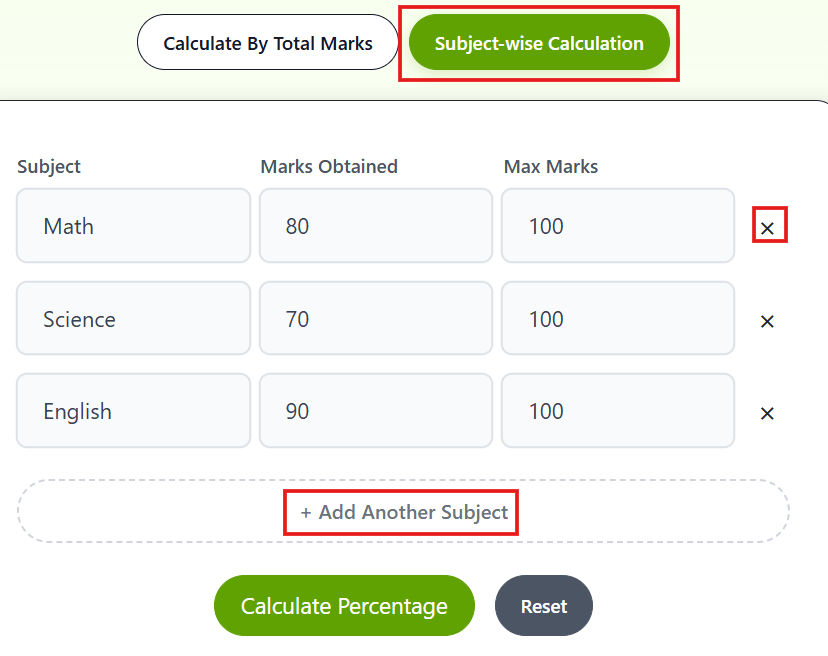
Subject-wise Calculation: How to Calculate Percentage of Marks for Multiple Subjects
This mode is for when you want more detailed results. Enter obtained and maximum marks for each subject separately. You can add or remove subjects as per your needs. The tool adds everything up and gives you your overall percentage.
After getting your result, you can click the Reset button and start a new calculation. We have not set any limit.
Example: Suppose you are a 12th standard student. Your results just came out. You scored the following marks:
English: 78 out of 100
Maths: 92 out of 100
Science: 85 out of 100
Hindi: 70 out of 100
Social Studies: 80 out of 100
Total obtained = 405. Total maximum = 500.
In the example, 100 is just an example. you can adjust it if needed. Now you know your percentage. You can directly use this when filling college admission forms. If your target college has a qualifying cutoff of 75%, you already know you are eligible before anyone tells you.
This is especially helpful if you want to know how to calculate percentage of marks of 6 subjects or when each subject has a different maximum mark. Our tool handles all of that automatically. Just enter marks for each subject, click calculate and you are done.
Note: Use this calculator only if each subject has separate total maximum marks. It is perfect for student’s daily needs, like class tests where obtained marks and maximum marks are different.
Why Should You Use This Calculator?
Manual calculation sounds easy until you are doing it for 6 subjects at midnight. One wrong step and your whole number changes. That is where this tool saves you.
Accurate Result: It uses the standard formula. No room for human error.
Quick Response: You click calculate and get your result within a second. Because I know nowadays Gen Z students hate waiting periods.
Subject-wise Mode: Not every student needs only total marks calculation. Some need it subject by subject. Both modes are available in the same tool.
Free and Mobile Friendly: Open it from your phone, tablet, or laptop. It works on every screen size without any issue.
One thing that trips students up is figuring out how to calculate percentage of marks in CBSE or board exams where subjects have different maximum marks. Our subject-wise mode handles that. It does not matter which board or university you are from. The formula works everywhere.
Percentage to Marks: How to Reverse the Calculation
Sometimes you already know the percentage and want to find the marks. Say your college tells you that you need 75% to qualify. You want to know how many marks that means out of 500. The formula flips around:
So
Our percentage to marks calculator does this in one click too. Just switch the direction of your calculation.
Frequently Asked Questions
How do I calculate percentage from marks?
Use this formula: (Obtained Marks / Total Marks) x 100. Or just enter your marks in our calculator above and get the result instantly.
What is 450 out of 500 in percentage?
(450 / 500) x 100 = 90%. You can verify this in the calculator above in one click.
Can I calculate percentage for multiple subjects separately?
Yes. Switch to the Subject-wise Calculation tab. Enter marks for each subject individually and the tool calculates your total percentage automatically.
How to calculate percentage of marks in CBSE?
CBSE students can use this calculator too. It’s not limited to any specific board. It works for all mark percentage calculation.
What if my maximum marks are not 100?
That is fine. Enter the actual maximum marks for that subject. The formula adjusts automatically.
How to calculate percentage of marks of 6 subjects?
Use the Subject-wise Percentage Calculator. Enter obtained marks and total marks for all six subjects, one by one. Then click Calculate.
How to convert marks into percentage for different maximum marks per subject?
Use the Subject-wise Calculation tab. Enter each subject’s obtained marks and its own maximum marks separately. The tool calculates your total percentage based on the combined values.
How to find percentage of marks in 10th or 12th?
Enter your total obtained marks in the first box and your total maximum marks in the second box. Click Calculate. The formula is the same regardless of your class or board.
Published By: CutoffCalculator Team
Admin
This calculator tool is developed and published by the CutoffCalculator Team. Our mission is to create an all-in-one platform for students that makes academics and education smoother.
Disclaimer: Our tool uses past data and trends, so it may be inaccurate. Always check with the official universities. If you find anything wrong, please report it immediately at [email protected], and we will update it as soon as possible.