Percentage Calculator: Percentage Decrease, Increase, and Finding Percentages in Seconds
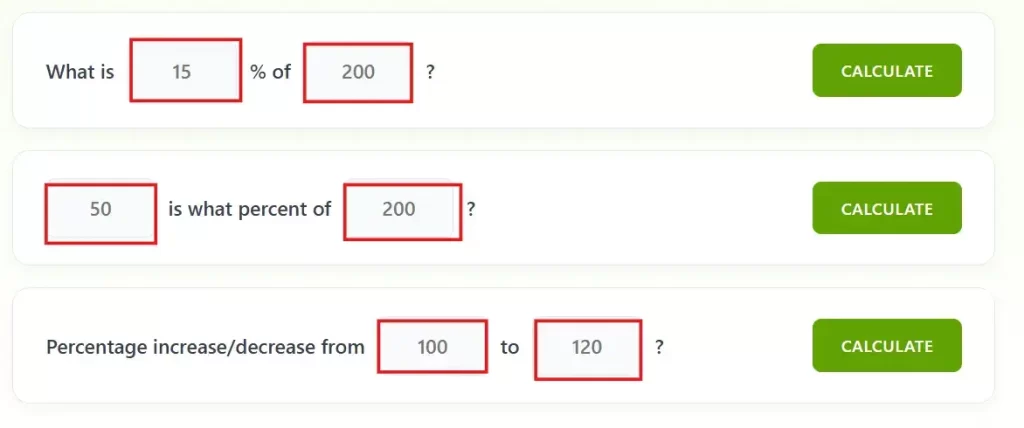
Three calculations in one place. Find what percentage of a number is, check what percent one number is of another, or use the percentage decrease calculator to track how much something went down. No formula needed.
A percentage calculator is an online tool that lets you compute percentages using various methods. These calculators apply different formulas based on the specific situation. Here are the most common percentage calculations:
How to Use the Percentage Calculator?
This tool is simple and straightforward. We designed it like simple sentences. Each box is labeled as a sentence, so you already know exactly what to enter. With this, you won’t get confused.
Row 1: Find Percentage (%) of a Number
Use this first row if you want to know, “What is X% of this number?” Fill in the percentage and the number. Click Calculate. The tool gives the exact result.
Example: What is 15% of 200? Answer: 30
Use case: Useful for students daily math, discount etc.
Formula:
Row 2: Find What Percentage One Number Is of Another
Use this second row if you want to know, “What percentage is this number of that one?” Enter the part and the whole. Click Calculate. You get the percentage instantly.
Example: 50 is what percent of 200? Answer: 25%
Use case: This calculator can be used for marks percentage calculation, attendance calculation, target calculation etc.
Formula:
Row 3: Percentage Decrease Calculator and Increase Calculator
Use this row when you want to calculate percentage increase or use it as a percentage decrease calculator. Enter the old value and the new value. Click Calculate. The tool shows the exact percentage change and tells you whether it went up or down.
Example: rom 100 to 120 Answer: 20% Increase
Use case: This is mainly used when you need to calculate percentage increase or decrease between two values. Perfect for tracking salary hikes, price changes, score improvements, or any before-and-after comparison.
Formula:
All above tools can be used in personal, professional and students. Everybody can use it in daily life.
Real Example: How a Student Can Use This
Suppose you scored 156 marks out of 200 in your semester exam. You want to know your percentage before filling out a scholarship form that asks for it.
Open the tool
Go to Row 2 which reads “_ is what percent of _?”
Enter 156 and 200
Click Calculate
Your result: 78%
What Makes This Percentage Decrease Calculator Different?
As you already know, the calculator has three rows, each solving a different type of percentage problem. All three calculators are on the same page so you can jump between them without clicking any tabs or switching pages.
This tool is very fast and once you enter your numbers and click Calculate. Your answer appears within a second with the formula which is used. So you are not just getting a result, you are understanding how it was calculated.
Frequently Asked Questions
How do I find a percentage of a number?
Use this formula: (Percentage / 100) x Total Number. So 15% of 300 is (15/100) x 300 = 45. Or just use Row 1 of the calculator above.
How do I find what percentage one number is of another?
Divide the part by the whole and multiply by 100. For example, 50 out of 200 is (50/200) x 100 = 25%. Row 2 does this for you instantly.
What is percentage change and how is it calculated?
Percentage change shows how much a value went up or down. Formula: ((New – Old) / Old) x 100. A positive result means an increase, a negative result means a decrease.
How do I use a percentage decrease calculator?
Go to Row 3 of our tool. Enter the original value in the first box and the new lower value in the second box. Click Calculate. The tool gives you the exact percentage decrease and confirms it went down.
How to calculate percentage increase between two numbers?
Enter the original value and the new higher value in Row 3. Click Calculate. The formula used is: ((New – Old) / Old) × 100. A positive result means an increase.
Published By: CutoffCalculator Team
Admin
This calculator tool is developed and published by the CutoffCalculator Team. Our mission is to create an all-in-one platform for students that makes academics and education smoother.
Disclaimer: Our tool uses past data and trends, so it may be inaccurate. Always check with the official universities. If you find anything wrong, please report it immediately at [email protected], and we will update it as soon as possible.