Relative Humidity Calculator: Find RH From Dew Point or Wet Bulb Temperature
Relative humidity tells you how much water vapor is in the air compared to the maximum it could hold at that temperature. This relative humidity calculator gives you the exact RH percentage in one click, whether you have a dew point reading or a wet bulb reading. You’ll also get the comfort level and both vapor pressure values, so you don’t need to touch the formula yourself.
What is Relative Humidity? (And How Do I Calculate It?)
Relative Humidity is the ratio of the actual amount of water vapor in the air to the maximum amount of water vapor the air can hold at that same temperature. It is always expressed as a percentage between 0% and 100%.
Think of air like a sponge. A dry sponge can absorb a lot of water. A sponge already half-wet can absorb less. And a fully soaked sponge cannot absorb anything more. Air works the same way with moisture.
The key thing to understand here is that relative humidity changes with temperature, even if the actual moisture in the air stays the same. Warm air can hold more water vapor than cold air. So if you heat up air without adding any moisture, its relative humidity actually drops. This is exactly why indoor air feels so dry in winter when you run the heater.
To calculate relative humidity with temperature, you need the actual vapor pressure and saturation vapor pressure at your given air temperature. Our calculator works out both vapor pressures automatically once you enter your temperatures, so you never have to run the formula by hand.
How to Calculate Relative Humidity with This Tool?
Step 1
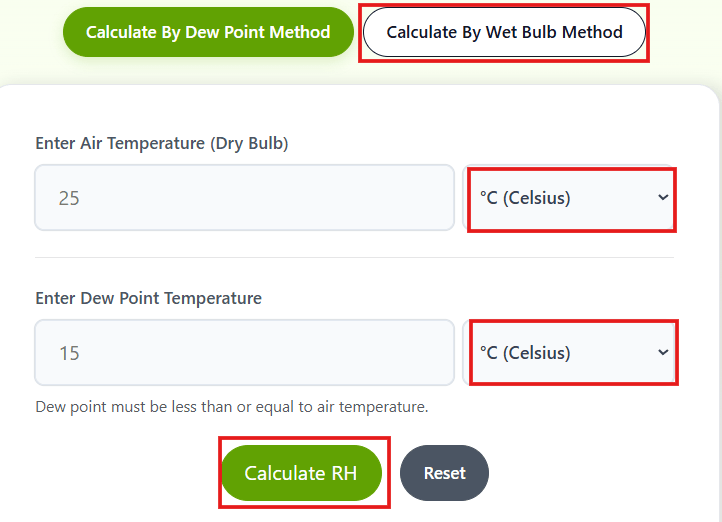
Pick your method at the top: Dew Point or Wet Bulb.
Step 2
Enter your Air Temperature (Dry Bulb) in Celsius or Fahrenheit.
Step 3
Enter your Dew Point or Wet Bulb reading, same unit choice.
Step 4
Click Calculate RH.
You will get your RH percentage, a comfort level label, and the actual and saturation vapor pressure values shown below the result. To calculate a new value, just click the Reset button.
Student Use Case:
Suppose you are a physics student and your teacher gives you this data:
you need to calculate relative humidity from an air temperature of 30°C and a dew point of 20°C.
Open the calculator, select “Dew Point Method,” enter 30 in the air temperature box, enter 20 in the dew point box, keep both units as Celsius, and click Calculate.
Your result: RH = 54.3% (Comfortable – Optimal for indoors)
The tool also shows you the actual vapor pressure and saturation vapor pressure so you can write the full solution in your assignment.
Dew Point Method vs Wet Bulb Method: Which One Should You Use?
Both methods calculate relative humidity but they use different input data. The right method depends on what data you have available.
Dew Point Method: This is the more direct and accurate method. The dew point is the temperature at which air becomes fully saturated. When you have dew point data from a weather station or your lab equipment, always prefer this method. It uses the Magnus-Tetens formula: e = 6.112 x exp((17.67 x Td) / (Td + 243.5))
Wet Bulb Method: This method is used when you have a psychrometer (a two-thermometer instrument with one dry bulb and one wet bulb). It uses the psychrometric equation. The formula accounts for the evaporation cooling effect on the wet bulb thermometer.
Our relative humidity calculator supports both methods in the same tool. Just click the tab for the method you have data for. Both use the same input format so there is no learning curve switching between them.
What is Dew Point Temperature?
Dew Point is the temperature at which the air would need to cool down to become fully saturated, meaning water vapor starts to condense as dew or fog. A higher dew point means more moisture in the air.
One important rule: Dew point temperature can never be higher than air temperature. If you enter a dew point higher than air temperature, our calculator will alert you right away
What is Wet Bulb Temperature?
Wet Bulb Temperature is measured using a thermometer whose bulb is wrapped in a wet cloth. As water evaporates from the cloth, it cools the thermometer. The more dry the air, the more evaporation happens and the lower the wet bulb reading.
Just like dew point, wet bulb temperature also cannot exceed air temperature. Our tool will catch this error for you.
Does Altitude or Air Pressure Affect This Calculation?
Yes, slightly. The wet bulb method on this page assumes standard sea-level pressure (1013.25 hPa). If you’re at high altitude, your actual RH can differ a little from what the calculator shows. For most classroom and everyday use this difference is small enough to ignore, but if you’re doing engineering-level work, you’ll want a calculator that accepts a custom pressure input.
Understanding Your Result: Comfort Levels
Our calculator doesn’t just show you a number. It also tells you what that number means:
Below 30% RH: Too Dry. Air this dry can cause skin irritation, dry throat, and static electricity buildup. Common in winter or air-conditioned spaces.
30% to 60% RH: Comfortable. This is the ideal indoor range recommended by health and building standards.
Above 60% RH: Too Humid. Air this moist feels muggy and heavy. It also encourages mold growth and dust mites indoors.
Above 80% RH: Very Humid. Common during monsoon season or near water bodies. Feels uncomfortable and can damage electronics and furniture.
Frequently Asked Questions
Can relative humidity be above 100%?
Technically no, but in some special atmospheric conditions (supersaturation) it can momentarily exceed 100%. For practical calculations, RH is clamped between 0% and 100%.
What happens if dew point equals air temperature?
It means the air is fully saturated at 100% RH. This is when you see fog, dew on surfaces, or rain forming.
Does this calculator account for altitude or air pressure?
The wet bulb method assumes standard sea-level pressure. At high altitude, actual RH can differ slightly from the result shown here. For pressure-adjusted results, use a psychrometric calculator that accepts a custom pressure input.
What counts as comfortable humidity in different settings?
For a home or classroom, 30% to 60% RH is the standard comfortable range. Labs, server rooms, and pharmaceutical storage often need tighter control, sometimes 40% to 55%, since equipment and materials are more sensitive to moisture swings than people are.
Published By: CutoffCalculator Team
Admin
This calculator tool is developed and published by the CutoffCalculator Team. Our mission is to create an all-in-one platform for students that makes academics and education smoother.
Disclaimer: This calculator uses standard atmospheric formulas (Magnus-Tetens and the psychrometric equation) at sea-level pressure. Results are for educational and general use. If you spot an error, report it at [email protected] and we'll fix it fast.